Twenty-Four Words Worth More Than Your 401(k): Mastering the HashPack Recovery Phrase
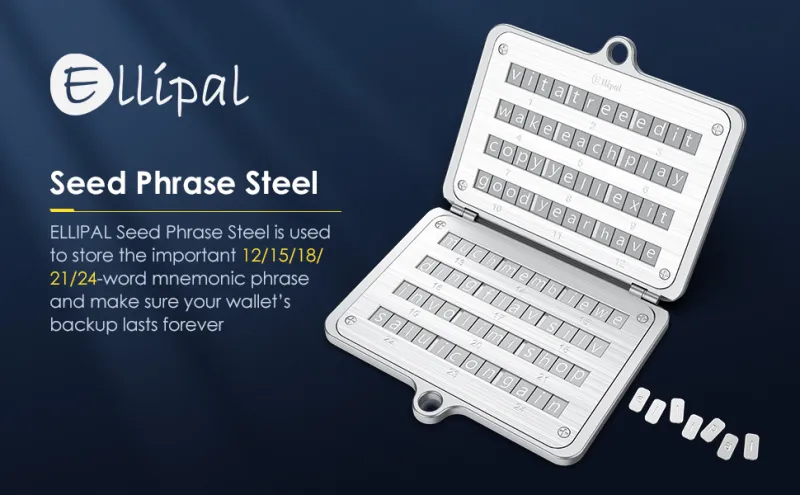
Photo: steel seed phrase backup plate with handwritten recovery words on paper next to fireproof safe, via m.media-amazon.com
There's a moment in every HashPack user's life when the stakes become real. Maybe your laptop dies mid-transaction. Maybe your phone takes a swim in Lake Michigan. Whatever the trigger, you'll reach for one thing and one thing only: your 24-word recovery phrase. And if you stored it wrong, that's the moment you find out your HBAR is gone for good.
Let's make sure that moment never ends badly.
The Phrase Is the Wallet — Everything Else Is a Doorway
Here's the mental shift most beginners miss: your HashPack app, your browser extension, even your Ledger aren't your wallet. They're interfaces. The wallet — the actual, cryptographic control over your funds — lives entirely in those 24 words.
Anyone who obtains that phrase doesn't need your device, your PIN, or your fingerprint. They can reconstruct your wallet on their own machine from anywhere in the world and sweep every asset you own. There's no fraud department to call, no chargeback form, no FDIC safety net. Hedera transactions are final the moment they settle, and settlement takes seconds.
That's why the phrase outranks your bank password by an order of magnitude. A compromised bank password costs you an annoying phone call. A compromised mnemonic costs you everything, permanently.
Don't Confuse the Phrase with Your Account ID
A surprisingly common mix-up: people jot down their Hedera account ID — something like 0.0.1234567 — and think they've backed up their wallet. They haven't.
Your account ID is essentially your public mailing address on Hedera. It's what you share to receive HBAR. It's useless for recovery. Your mnemonic phrase is the private key material that proves ownership. One is your street address; the other is the deed to the house.
When HashPack walks you through setup, it shows the 24 words once and asks you to confirm a few of them. That's your one organic chance to capture them accurately. Slow down. Write them in order. Every word matters, and the order matters just as much.
Storage Mistakes That Sink American Crypto Holders
The failure modes are remarkably consistent. Here's what not to do:
- Photographing the phrase. Screenshots and phone photos often sync automatically to iCloud or Google Photos. Cloud accounts get breached, and phones get stolen. A photo of your seed phrase on a cloud-connected device is an open vault door.
- Notes apps and email drafts. Same problem, different app. Anything synced to the internet is anything an attacker can eventually reach.
- Password managers — with caveats. Storing a seed phrase in a password manager is a step up from a photo, but it concentrates risk. If your manager's vault is compromised, so is everything.
- The safety deposit box trap. A bank lockbox sounds bulletproof, but there's a catch: boxes are only accessible during banking hours, and banks can seal them upon account closure, legal issues, or even the depositor's death — leaving heirs locked out for months. If you go this route, understand the access limitations.
- Telling nobody. The opposite failure: the phrase is locked away so securely that when something happens to you, your family can't find it. Your HBAR becomes permanently inaccessible.
A Practical US Storage Setup
For most American holders, a layered approach beats a single perfect solution:
- Write the phrase on acid-free archival paper (or stamp it into a steel plate — options like metal seed storage plates run $20–$60 online). Paper burns; steel survives house fires and floods.
- Store the primary copy in a home fireproof safe bolted to the floor or wall. Bolting matters — a portable safe is a burglar's carry-out order.
- Keep a second copy offsite in a hidden location you trust: a family member's home, or a bank lockbox if you've weighed the access limitations and your holdings justify it.
- Never store a digital copy of any kind. Analog only.
If you hold serious value, mention the existence of the backup in your estate planning documents — without writing the phrase itself anywhere discoverable.
Prove Your Backup Works: The Test-Restore Walkthrough
A backup you've never tested is a hope, not a plan. Here's how to verify yours, safely, in about fifteen minutes.
Step 1: Re-verify inside HashPack. Open your existing wallet's settings and look for the recovery phrase or verification option. HashPack will re-display the phrase or ask you to confirm selected words. Compare word-for-word against what you wrote down — including the order. Fix any discrepancies now.
Step 2: Do a dry-run restore. Download HashPack on a different device — an old laptop, a spare phone. Choose the option to import or restore an existing wallet using a recovery phrase. Enter your 24 words.
Step 3: Confirm the account appears. If your Hedera account ID and balances show up, your backup is real and functional.
Step 4: Wipe the test device. Delete the HashPack app and clear browser data on that test device so a second copy of your key material isn't lingering around.
A few rules for this exercise: never enter your phrase on a device you don't control, never do it over public Wi-Fi, and never, under any circumstances, type your phrase into a website because someone in a Discord or a support chat asked you to. Legitimate support — including anything from HashPack Hub — will never request your words. Ever.
The Bottom Line
Your recovery phrase is the single most valuable string of words you own — worth more than your Social Security number, your passport, and your bank login combined, because unlike those, it can't be reissued. Write it down carefully, store it redundantly in analog form, test the restore path on a spare device, and keep it far away from anything that syncs to the cloud.
Ten minutes of paranoia today beats a lifetime of regret tomorrow.